.png)
Inbound Ring Settings
Ring settings apply to events triggered by Ring Extensions and Emergency Alerts.
You can configure the incoming ring/alert tone, volume, screen pattern, and caller information display.
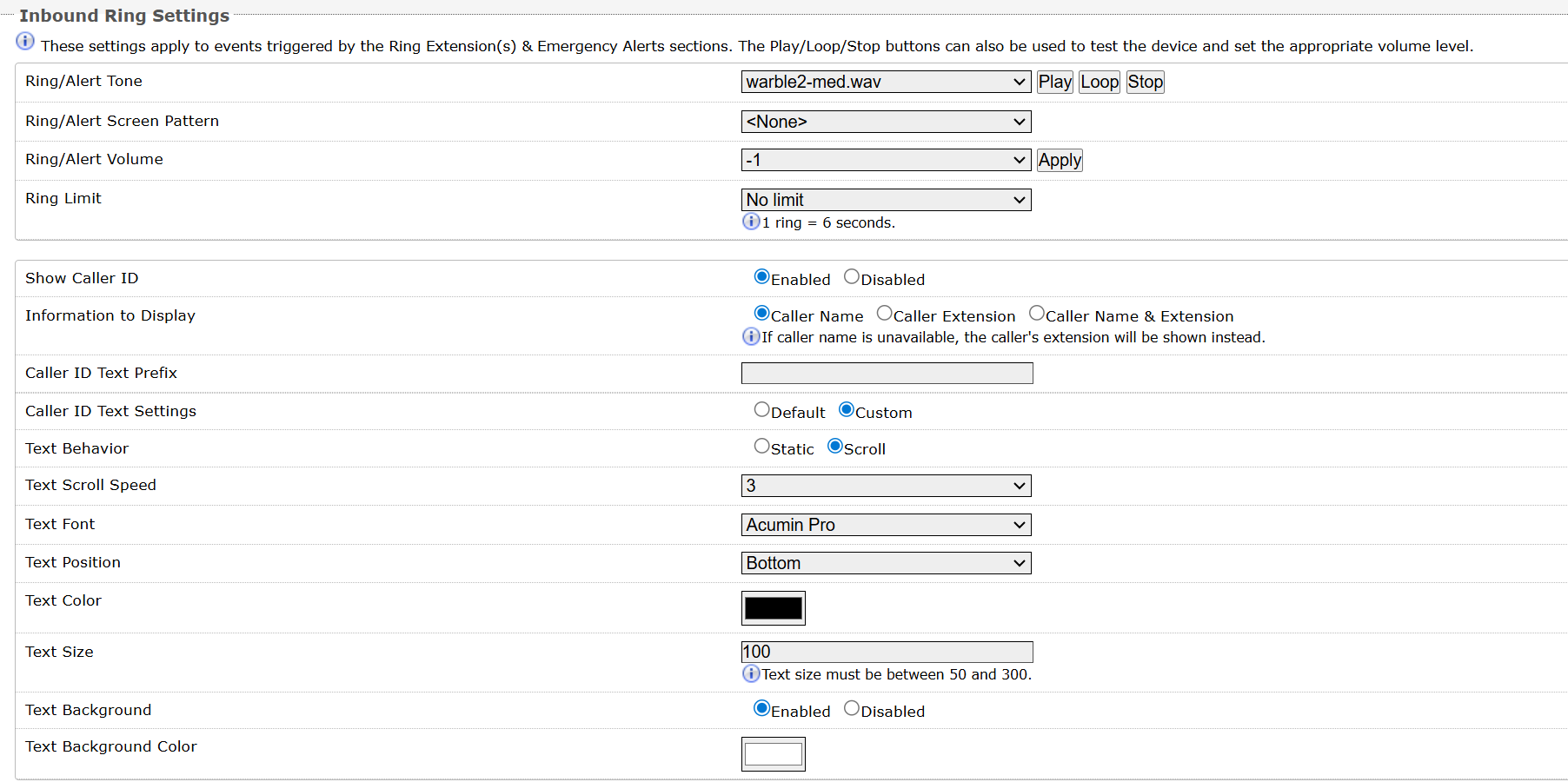
Ring/Alert Tone
Select an audio file to play when a ring event is detected on the SIP Ring Extension. For testing purposes, the audio file can be played immediately from the web interface using the Play, Loop, and Stop buttons.
Note
This is the “Default” tone that will be played if you set:
<Use Default Ring Tone> as the Ring Tone under Additional Features → Additional Ring Extension
<Use Default Page Tone> as the Page Tone under Advanced Settings → Advanced Multicast.
Ring/Alert Screen Pattern
Select a screen pattern to display on the LCD screen on inbound ring events. Screen patterns are configured under Display → Screens.
Ring/Alert Volume
Set the speaker volume for a SIP Ring event. This setting is an amplifier gain control, and the output level will depend on the levels recorded into the source audio file played from memory. This setting is only used for local tones, and not when receiving multicast (see Page Speaker Volume below).
Ring Limit
Typically set to no limit, this feature can be used to set a limit on how long the speaker will ring before timing out. A new ring event is required before the speaker will play the audio file again.
Show Caller ID
Enable displaying the caller information. This feature is available only on the Algo 8410/8420.
Information to Display
Display the Caller Name, Caller Extension, or Caller Name & Extension.
The Caller Name is taken from the SIP From header. For Algo devices, the Caller Name is configured in Basic Settings → SIP → Display Name (Optional).
If this information isn’t available, the caller's extension will be shown instead.
Caller ID Text Prefix
Specify the leading text before the caller information. Caller ID Text Prefix must be 100 characters or less.
Caller ID Text Settings
Specify how the caller information text be displayed on the screen.
Text Behavior
Specify whether the text is static or scrolling.
Text Scroll Speed
Specify the text scroll speed. Speed increases from 1 to 5.
Text Font
Select a text font.
Text Position
Select a text display position.
Text Color
Select a text color.
Text Size
Select a text font size. The text size must be between 50 and 300.
Text Background
Enable or disable the text background color.
Text Background Color
Select a text background color.